Cross-object formulas to display parent/reference object fields can be used for merge fields in Office File Creator.
*This feature is available in Office File Creator Ver. 2. In Ver. 1, create a cross-object formula field in the target object and set the created field as the merge field.
About Cross-Object Formulas
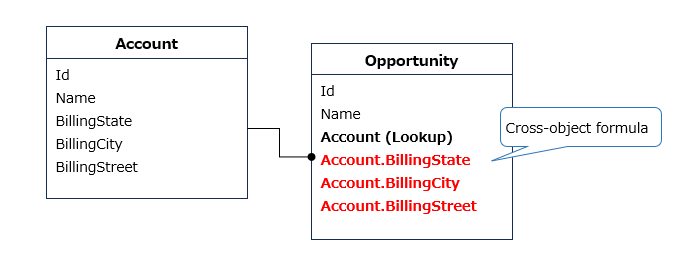
A Cross-object formula is the formula that displays the fields of the referenced object when the object has lookup fields.
For example, the Opportunity object has an Account lookup field. If you want to display the Account's Billing State/Province on the Opportunity record screen, the cross-object formula is "Account.BillingState".
Cross-Object Formula Format
- A cross-object formula is "referenced field name.referenced object field name".
- Connect the reference fields with "." from child to parent, tracing upward.
- If the reference field is a standard field, it is traced up excluding the Id at the end of the reference field name.
- If the reference field is a custom field, change "__c" at the end of the reference field name to "__r" and trace up.
- In Office File Creator, fields of objects up to five levels above can be used in merge fields.
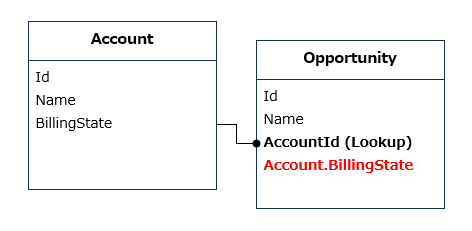
Example: Reference field is a standard field
Display the BillingState field of Account from Opportunity
Cross-object formula: Account.BillingState
Example: Reference field is a custom field (1)
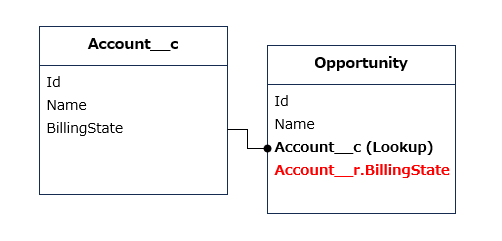
Display the BillingState field of Account__c from Opportunity
Cross-object formula: Account__r.BillingState
Example: Reference field is a custom field (2)
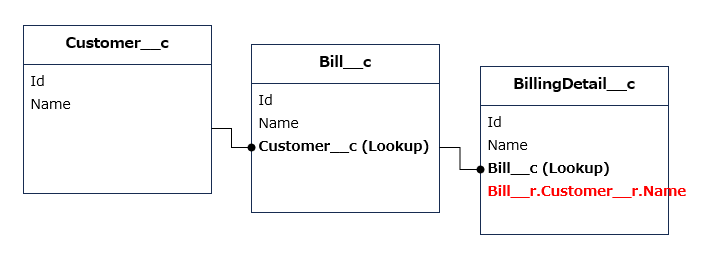
Display the Name field of Customer__c from BillingDetail__c through Bill__c
Cross-object formula: Bill__r.Customer__r.Name
Merge Fields Settings
The format of the merge field is as follows.
{!Object API Name.Cross-object formula}
Example1. BillingState field of Account of Opportunity
{!Opportunity.Account.BillingState}
Example2. Email field of Owner of Opportunity
{!Opportunity.Owner.Email}
Example3. DeliveryLocation field of Customer__c of Bill__c of BillingDetail__c
{!BillingDetail__c.Bill__r.Customer__r.DeliveryLocation__c}
Memo
The field whose data type is address, such as the Billing Address of the Account object, is a compound field consisting of state, city, street, etc. In cross-object formulas, it is necessary to get the BillingState, BillingCity, etc. separately.
For more information on address compound fields, please refer to the Salesforce guide.
Available Fields When the Owner Field Refers to User and Queue
If the owner field references more than one object in the user and queue, as in the case object, some fields are available in the cross-object formula.
List of available Owner Fields (for objects that reference users and queues)
|
Field Name |
Cross-Object Formula |
Example of Merge Field |
|
Id |
Owner.Id |
{!Case.Owner.Id} |
|
Name |
Owner.Name |
{!Case.Owner.Name} |
|
|
Owner.Email |
{!Case.Owner.Email} |
|
Username |
Owner.Username |
{!Case.Owner.Username} |
|
LastName |
Owner.LastName |
{!Case.Owner.LastName} |
|
FirstName |
Owner.FirstName |
{!Case.Owner.FirstName} |
|
Alias |
Owner.Alias |
{!Case.Owner.Alias} |
|
Title |
Owner.Title |
{!Case.Owner.Title} |
|
Phone |
Owner.Phone |
{!Case.Owner.Phone} |
|
UserRoleId |
Owner.UserRoleId |
{!Case.Owner.UserRoleId} |
|
ProfileId |
Owner.ProfileId |
{!Case.Owner.ProfileId} |
|
LastReferencedDate |
Owner.LastReferencedDate |
{!Case.Owner.LastReferencedDate} |
|
LastViewedDate |
Owner.LastViewedDate |
{!Case.Owner.LastViewedDate} |
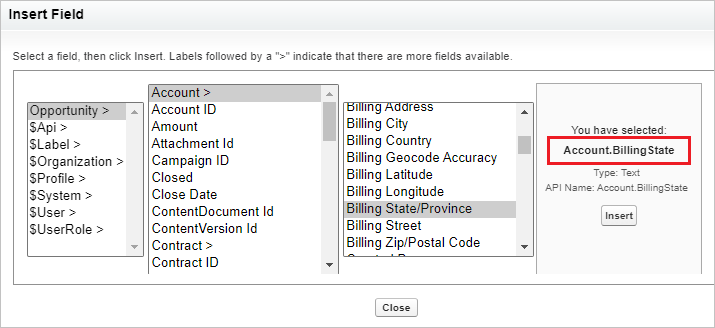
(Reference) Cross-Object Formula Creation Screen
Cross-object formulas can be viewed on the screen of creating the formula field of the object.