We've released a new version of Office File Creator Ver.2.
Revision Details
New Features (HTML Preview)
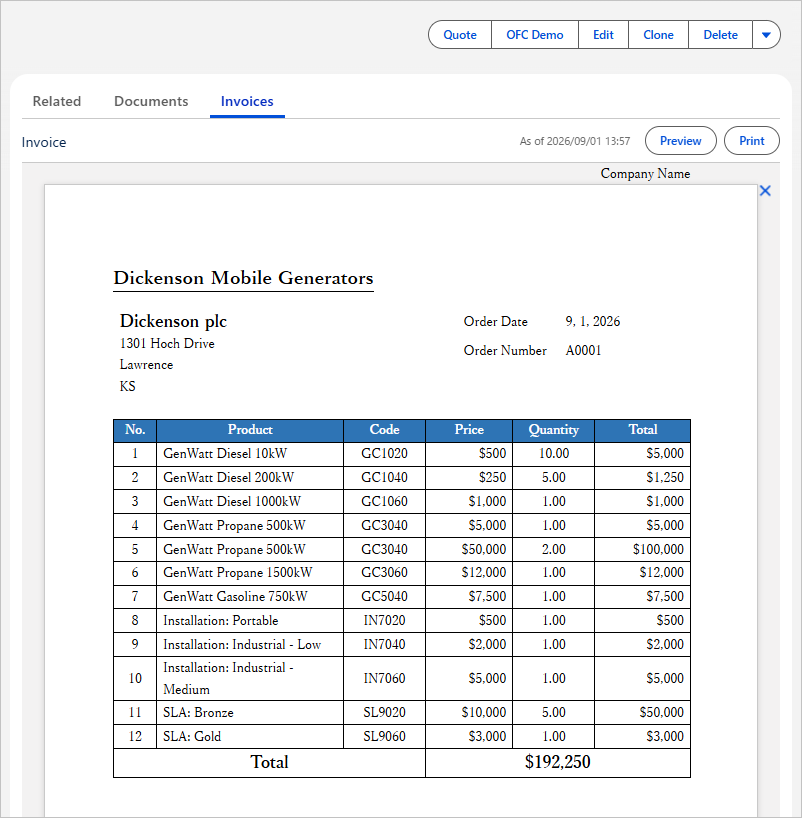
Added the HTML Preview feature. Templates are created in Word. This feature is available in Office File Creator Pro.
- By using the ofcHtml component, you can display a preview on the record detail page.
- The preview is also available from the custom buttons, Lightning component buttons, and flows.
- You can save a PDF using the browser's print function. Conventional PDF generation with Visualforce has various limitations, but a PDF created with the browser's print function is not subject to these limitations.
Differences Between PDF Output and the PDF from HTML Preview (via Browser)
|
|
PDF (PDF generated by Visualforce) |
HTML (PDF saved from the browser) |
|
Supported Editions |
○ All editions |
△ Pro edition only |
|
Font |
△ Four font families only (Arial Unicode MS for multibyte text) |
○ Word fonts can be used |
|
Bold / Italic |
△ Not available with Arial Unicode MS |
○ Supported |
|
Page Breaks |
× Page breaks fall partway through table borders × Table headers are not shown on the next page |
○ Page breaks fall at clean positions in table borders ○ Table headers are also shown on the next page *Page breaks are determined automatically by the browser's print function. |
|
Header / Footer |
○ Two lines of text can be used ○ Images can be used |
△ A single line of text only × Images cannot be used |
|
Download |
○ Supported |
△ PDF output is available through the browser's print function. *Automatic download is not supported. |
|
Save to Salesforce |
○ Supported |
× Not supported *After saving a PDF with the browser's print function, upload the PDF to Salesforce. |
Reference
Bug Fixes
- Fixed a bug in Excel output where conditional formatting on child records was not output correctly.
- Fixed a bug in Word output where the width of an inserted image was incorrect in cells that spanned three or more columns or whose width differed from the column width.
- Fixed a bug in PowerPoint output where merged fields in the notes of the second and later slides were not replaced.
- Fixed a bug in PDF output where the left border of the first column and the right border of rows containing merged cells were missing in tables that used a Word table style.
- Fixed a bug in PDF output where a strikethrough was applied to hyperlinks.
- Fixed other minor bugs.
Other Changes
- Fixed an issue in Excel output where, for master object fields other than numeric and date fields and for all child record fields, a cell kept an invisible empty string and was therefore not treated as blank when the record value of a merged field was blank.
- Improved PDF output to no longer produce unnecessary blank pages.
- Changed the color of borders set to automatic (auto) in PDF output from dark gray (#0C0C0C) to black (#000000).
- Changed batch output of multiple files during preview from not supported to supported for up to 20 files.
- Improved the wording of some error messages.
- Improved output performance.
- Added and deleted fields, changed field labels, and changed the page layout of the OFC_Template object.
- Changed field labels of the OFC_Child Object Option object.
OFC_Template Object Change Details
- Added the fields "FallbackFontStyle__c", "CustomButtonURL_Preview__c", "CustomButtonURL_Print__c", "TemplatePackageVersion__c", and "TemplatePackageVersionFml__c".
- Deleted the fields "CustomButtonURL_PreviewPDF__c", "TemplateUploadedPackageVersion__c", and "TemplateUploadedPackageVersionFml__c".
- Added the picklist value "HTML(.html)" to the "OutputFileType__c" field.
- Changed the label of the "IsOutputNameNotIdForReferenceField__c" field from "Output Name Not Id For Reference Field" to "Output Name for Reference Fields".
- Changed the label of the "ImageDefaultHeight__c" field from "(Word/PDF) Image Default Height (mm)" to "(Word/PDF/HTML) Image Height (mm)".
- Changed the label of the "ImageSizeInTableCell__c" field from "(Word/PDF) Image Size in Table Cell (%)" to "(Word/PDF/HTML) Image Size in Table (%)".
- Changed the page layout to "OFC_TemplateLayout_ver3".
OFC_Child Object Option Object Change Details
- Changed the label of the "IsGroupUnit__c" field from "(PDF) Group Unit" to "(PDF) Page Break by Group".
Version
Ver.2.19
*Existing users of Ver.2 have been upgraded.
Actions Required for the New Version
This version upgrade requires some manual steps. Please follow the procedures below.
Grant Field-Level Security
Grant administrator users read and edit access to the custom fields of the OFC_Template object.
|
Field Name |
Field Label |
|
ofc2__FallbackFontStyle__c |
HTML Fallback Font Style |
|
ofc2__CustomButtonURL_Preview__c |
Custom Button URL (Preview) |
|
ofc2__CustomButtonURL_Print__c |
Custom Button URL (Print) |
|
ofc2__TemplatePackageVersion__c |
Template Package Version |
|
ofc2__TemplatePackageVersionFml__c |
Template Package Version (system) |
Grant Access to the Apex Class
Grant access to the following Apex class on the profile or permission set.
ofc2.OFCHtmlController
Grant Access to the Visualforce Page
Grant access to the following Visualforce page on the profile or permission.
ofc2.OFCHtml
Add Picklist Value
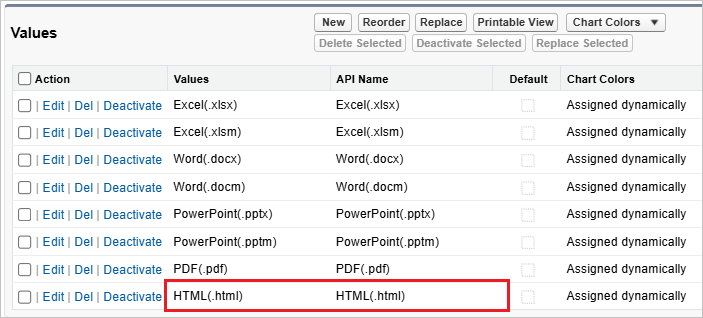
Add the picklist value "HTML(.html)" to the "Output File Type" (ofc2__OutputFileType__c) field of the OFC_Template object using the steps below.
- In Setup > Object Manager > OFC_Template > Fields & Relationships, open the "Output File Type" field (Field Name: ofc2__OutputFileType__c).
- In the "Values" section, click the "New" button.
- Enter "HTML(.html)" and click the "Save" button. Confirm that "HTML(.html)" has been added as both the value and the API name.
Set Field Dependency
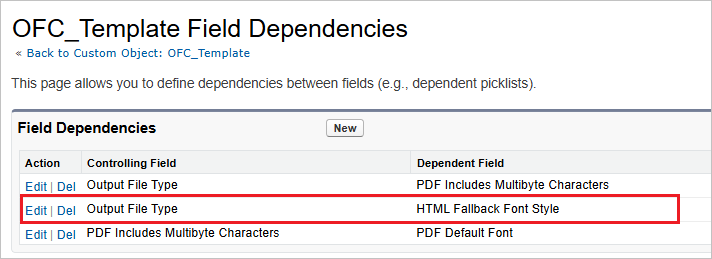
Set up the field dependency between "Output File Type (OutputFileType__c)" and "HTML Fallback Font Style (FallbackFontStyle__c)".
- In Setup > Object Manager > OFC_Template > Fields & Relationships, click the "Field Dependencies" button.
- Click the "Edit" link on the row where the controlling field is "Output File Type" and the dependent field is "HTML Fallback Font Style".
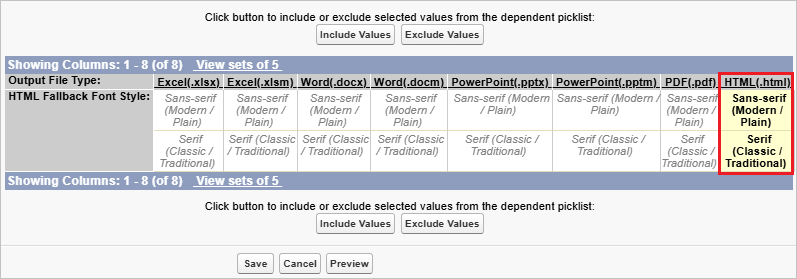
- In the "HTML(.html)" column, select "Sans-serif" and "Serif", and then click the "Include Values" button.
- Click the "Save" button.
Delete Fields
Delete the following fields in Object Manager > OFC_Template > Fields & Relationships.
|
API Name |
Field Label |
|
ofc2__CustomButtonURL_PreviewPDF__c |
[Deprecated] URL (Preview PDF) |
|
ofc2__TemplateUploadedPackageVersionFml__c |
[Deprecated] Template Version |
|
ofc2__TemplateUploadedPackageVersion__c |
[Deprecated] Template Version (sys) |
Change Page Layout
Change the page layout as follows. Delete the old page layout.
- Set the page layout for the OFC_Template object to "OFC_TemplateLayout_ver3".
