We've released a new version of Office File Creator Ver. 2.
Revision Details
Added an action (Save PDF) that can be called from a record-triggered flow
Save PDF files by calling OFC actions in the record trigger flow. Only PDF file format is supported.
*This feature is available in Office File Creator Pro.
Use in Record-Triggered Flow (PDF)
Call "OFC - Save as PDF" action

Added the OFCApex class (Save PDF), which can be called from an Apex class
Call OFC's Apex class from the Apex class and save the PDF file. Only PDF file format is supported.
*This feature is available in Office File Creator Pro.
Sample Code
ofc2.OFCSavePDF.Requests req = new ofc2.OFCSavePDF.Requests();
req.recordId = 'xxxxxx';
req.templateApiName = 'OpportunityInvoice';
req.executionName = 'Call From Apex';
ofc2.OFCSavePDF.Results result = ofc2.OFCSavePDF.execute(req);
System.debug('result=' + result);
Added child record block output for Word, PowerPoint, and PDF
Block output of child records (multiple lines per record) has been supported only for Excel, but now Word/PowerPoint/PDF also support block output.
*This feature is available in Office File Creator Pro.
When outputting Word/PowerPoint/PDF, all merge fields of the same child object should be set in a single table.

Word Output Sample

Added child record group output for Word, PowerPoint, and PDF
Group output of child records has been supported only for Excel, but now Word/PowerPoint/PDF also support group output.
*This feature is available in Office File Creator Pro.
When outputting Word/PowerPoint/PDF, all merge fields of the same child object should be set in a single table.

PDF Output Sample

Added support for cross-object formulas where the Owner references a user or a queue
Cross-object formula merge fields were not supported when the owner field referenced a user and a queue, such as a case object.
In the new version, some user fields can now be used as merge fields.
Output Reference Object (Parent) Field
Example of available Owner Fields
{!Case.Owner.Email}
{!Case.Owner.LastName}
{!Case.Owner.FirstName}
Added the Lt and Gt functions
When outputting Word/PowerPoint/PDF, if the template contains the symbol "<" or ">", the text may be misaligned and the layout may not be output correctly. Previously, it was necessary to create a formula field that displayed the symbol on the object and set the formula field as a merge field.
In the new version, there is no need to create formula fields by using the Lt and Gt functions.
Lt() Function: Output the symbol "<".
{!Lt()}
Gt() Function: Output the symbol ">".
{!Gt()}
*Mar. 20, 2025 In Ver. 2.13, the misalignment of characters when the symbols "<" and ">" are included has been resolved. As a result, Lt and Gt functions are now deprecated.
Avoided the Salesforce subquery limit when outputting long text area fields of child objects
If a child object contained long text area merge fields, Salesforce's subquery limitation was applied and the maximum number of child records was approximately 50-200 records. If the upper limit was exceeded, an error occurred.
In the new version, when a subquery restriction error occurs, only the child record where the error occurred is acquired by another method and there are no subquery limitations.
Salesforce Subquery Limitations (Ver. 1 only)
Bug Fixes
- Fixed a bug in Excel group output where cells merged in the row direction were not merged in the output.
- Fixed a bug in Word rich text image output where an error occurred when the image was blank.
- Fixed a bug in Excel output where "&" in the output file name was output as "&".
Other Changes
- Changed PDF output to display error details instead of the "Internal Server Error" message.
Version
Ver. 2.12
*Existing users of Ver. 2 have been upgraded.
Actions Required for the New Version
This version upgrade requires some manual steps. Please follow the procedures below.
Granting field-level security
Please grant the administrator user the permissions to read the following new fields in the OFC_Log object.
OFC Log
|
Label |
Field Name (API) |
|
Apex Class Name |
ApexClassName__c |
|
Execution Name |
ExecutionName__c |
|
Parent Request Id |
ParentRequestId__c |
|
Quiddity |
Quiddity__c |
Change the page layout
Change the page layout of OFC_Log object to "OFC_LogLayout_ver3". Please delete the old page layout.
OFC Pro/Request to change a template with two or more lines of merge fields of the same child object(Word/PowerPoint/PDF)
With the new Word/PowerPoint/PDF block output of child records, if merge fields of the same child object are set in a template for two or more lines, it will be considered block output, just as in Excel. This will result in an error in the existing template. This will apply to existing templates after April 1, 2025.
If all of the following three conditions apply, please take action.
Patterns requiring your action
- Using OFC Pro.
- File format is Word/PowerPoint/PDF.
- The same child object's merge fields are set more than two lines.
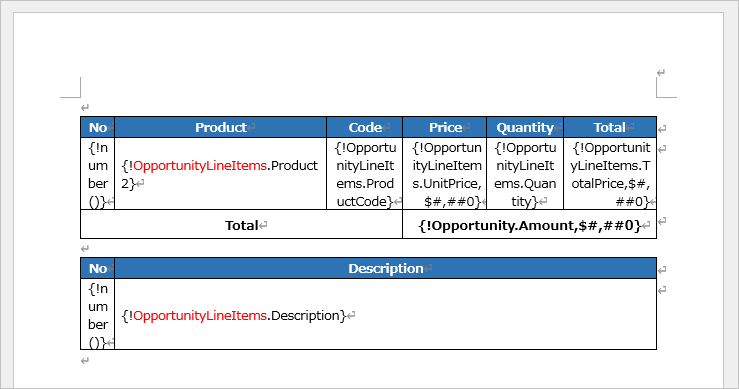
Example of a template that needs to be changed: Two lines of OpportunityLineItems merge fields are set.

Details of your action
- Please give different names to the child relationship name for the second and subsequent merge fields.
- Create a Child Object Option record and set in "(Pro) Advanced Relationship Settings" section.
Advanced Relationship Settings
Output different layouts for open and closed cases - Advanced Relationship Settings
Example of modified template: Change the second child relationship name to OpportunityLineItems2.

Schedule
Until March 31, 2025
Template upload version 2.11 or lower: No block output applied
Template upload version 2.12 or higher: Block output applied
After April 1, 2025
Block output is applied to all versions
*Please check the "Template Uploaded Package Version" field in the "System Information" section in the OFC_Template template record for the Template upload version.